
Shifts, policies and assignments.
Define each shift once with its hours and policy, assign people to it, and let attendance measure against the right baseline.
Capabilities
What you configure
Shifts with required hours
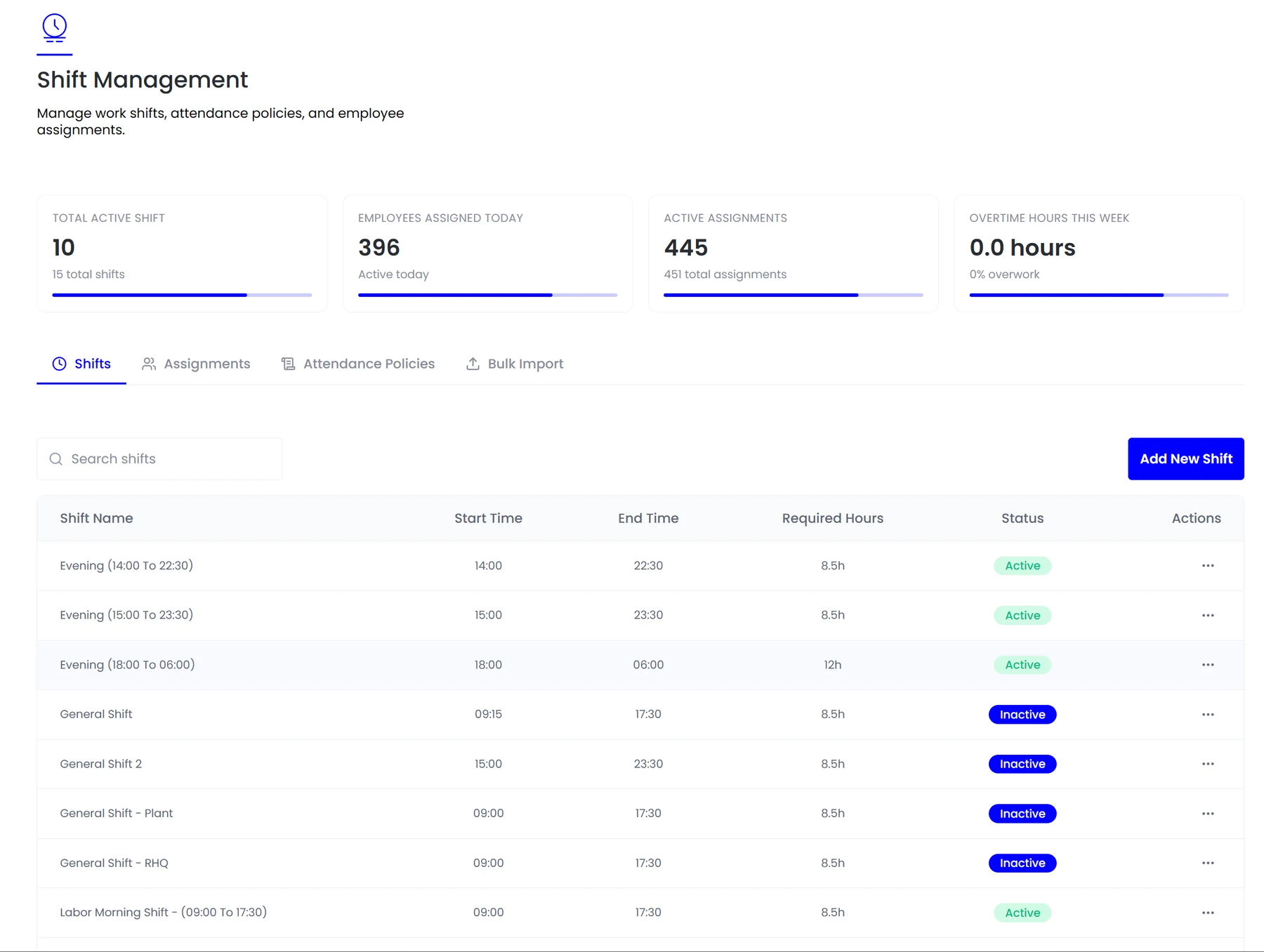
Start time, end time and the hours expected, including shifts that cross midnight without breaking the calculation.
Attendance policies
Grace periods, late thresholds and overtime rules attached to the shift rather than applied globally.
Assignments
Who is on which shift, visible as a live count of active assignments rather than a roster someone maintains separately.
Bulk import
Assign large groups at once, which matters when a site changes pattern or a season brings temporary crews.
In the product
Every shift with its hours and status, plus assignments and attendance policies.
Attendance data is meaningless without a baseline. Six hours worked is early, on time or overtime depending entirely on which shift the person was on.
- Shifts with required hours
- Attendance policies
- Assignments
- Bulk import
How it fits together
The roster is what makes attendance mean anything
Six hours worked is early, on time, or overtime depending entirely on which shift the person was on. Without that baseline, attendance data is a list of timestamps rather than information.
- Shift definitions
- Attendance policies
- Assignments
Shifts
The roster is the baseline
Shifts in Teamio carry their own required hours and attendance policy, so the same clock event is judged correctly for a morning shift and a night crew.

By the numbers
What it looks like in practice
With required hours defined per shift, overtime is calculated as it accrues rather than discovered in the payroll run, when it is too late to schedule around it.
Per shift
Required hours and policy
Midnight
Spans handled as one shift
Live
Assignment counts, not a roster
Bulk
Import for whole sites
In practice
Setting up a shift pattern
What a shift definition carries, and which modules read it afterwards.
Hours and span
Start, end and required hours, including spans that cross midnight, which are treated as one continuous shift rather than split across two payroll days.
Attendance policy
Grace period, late threshold and overtime rules attached to this shift, because a night crew and an office team need different tolerances.
Assignment
Who works it, as a live figure rather than a roster maintained separately and reconciled later.
Leave interaction
Approving leave checks against the assignments, so a shift is not signed down below its required cover by accident.
Payroll effect
Required hours become the baseline for overtime, so the same clock event is judged correctly for every pattern.
Compared
What a shift definition drives
One definition, used by several modules.
FAQ
Common questions
Can a shift apply to only one site?
Yes. Shifts are defined per site or entity, so a warehouse pattern and an office pattern coexist without either being treated as an exception.
Can shifts differ by site?
Yes. Shifts are defined per site or entity, so a warehouse pattern and an office pattern coexist without either being a special case.
What happens when someone swaps a shift?
The swap is recorded before the shift, so both the roster and the resulting attendance reflect who actually worked rather than who was originally scheduled.
See it running on your own data.
We will show the module working against records that look like yours, not a generic demo.